
Got an unexpected Amazon refund email? Before you click anything, read this. Refund phishing scams are on the rise — and most victims don’t realize it until after the damage is done.
Table of Contents
- Why Amazon Security Alert Scams Work So Well
- How the Amazon Security Alert Scam Typically Works
- The Most Important Rule: Never Click From the Email
- 9 Red Flags That the Amazon Security Alert Is a Scam
- What Happens If You Fall for a Security Alert Scam
- What to Do If You Already Clicked the Link
- How to Protect Yourself From Amazon Security Alert Scams
- Why Amazon Security Alert Scams Are Increasing
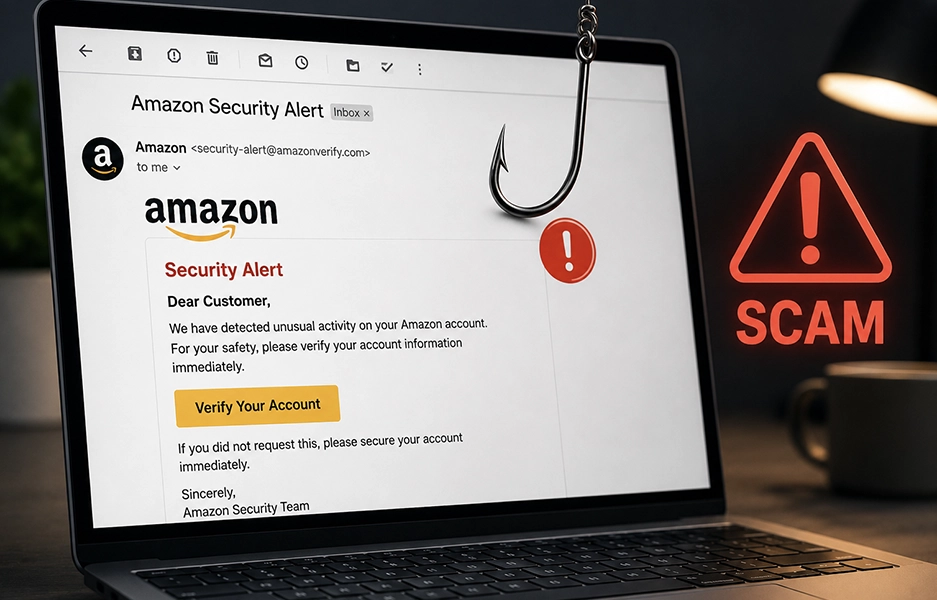
Security alert emails are among the most effective phishing scams targeting Amazon customers — and for good reason. Subject lines like “Amazon Security Alert: Suspicious Login Attempt,” “Unusual Activity Detected on Your Account,” or “We Locked Your Account for Protection” trigger immediate fear and urgency. They’re engineered to look exactly like real Amazon security notifications. This guide breaks down how the Amazon security alert scam works, nine red flags to watch for, and exactly what to do if you’ve already clicked.
Why Amazon Security Alert Scams Work So Well
Security alerts are uniquely effective as phishing vehicles because they exploit a specific emotional response: protective urgency. When you believe your account may be compromised, your instinct is to act immediately — to “fix” the problem before it gets worse. Scammers engineer fake Amazon security alerts to activate exactly that response.
- The alert frames you as a victim — someone needs to protect your account.
- It creates a sense of vulnerability — your password or payment data may already be at risk.
- It offers an easy solution — just click the button to “secure” your account.
By the time you realize the email is fake, you may have already entered your credentials on a counterfeit login page. These scams are part of a wider pattern of Amazon impersonation schemes that have grown more sophisticated and more common in recent years. The disguise of a security alert is especially effective because it mimics the kind of email Amazon genuinely sends.
How the Amazon Security Alert Scam Typically Works
Understanding the mechanics of the scam helps you recognize it before you engage. Here’s the typical sequence:
- You receive an email claiming a “suspicious login attempt from another country,” a new device accessing your account, a suspicious purchase, or that your account has been temporarily locked.
- The email includes a prominent button: “Secure My Account,” “Verify Activity,” “Confirm Identity,” or “Review Login Attempt.”
- Clicking the button takes you to a fake Amazon login page — a near-perfect visual replica of the real thing.
- When you enter your email and password, scammers capture those credentials in real time.
- If you have two-step verification enabled, some fake pages prompt for your authentication code too — allowing attackers to bypass that protection as well.
Within minutes of capturing your credentials, attackers may change your password, add new shipping addresses, and place expensive orders — leaving you locked out of your own Amazon account while they drain it.
The Most Important Rule: Never Click From the Email
This is the single most important thing to remember: never click any link or button inside a security alert email, regardless of how legitimate it looks.
Instead, follow these steps every time:
- Close or ignore the email — do not click any links.
- Open a new browser window or tab.
- Type amazon.com manually into the address bar.
- Log into your account using your normal credentials.
- Go to Account → Login & Security to review recent sign-in activity and connected devices.
- Check your Account → Message Center — legitimate Amazon security messages appear there.
If there is genuinely suspicious activity on your account, it will be visible inside your dashboard. If everything looks normal — the alert was almost certainly fake. This same verification rule applies to Amazon unusual activity emails, unexpected OTP texts, and password reset emails you didn’t initiate.
9 Red Flags That the Amazon Security Alert Is a Scam
Train yourself to spot these warning signs before engaging with any security alert email:
1. The sender email is slightly altered. Real Amazon security emails come from @amazon.com, @amazon.ca, or @amazon.co.uk. Fake versions use domains like @amazon-security-alert.net, @amaz0n-login.com, or @amazon-verification.co. One wrong character makes it fraudulent — inspect carefully.
2. It claims a foreign login but provides no specific details. Legitimate security notifications include IP address, device name, time stamp, and location. A vague “login attempt from Russia” with no supporting detail is a hallmark of phishing.
3. The link doesn’t lead to amazon.com. Hover over the button without clicking. If the URL doesn’t start with https://www.amazon.com/, it’s fake. Scammers include the word “amazon” in their URLs (e.g., amazon-security-check-login.net) to appear credible — but the domain is not Amazon.
4. It pressures immediate action. Phrases like “Respond within 24 hours,” “Your account will be permanently locked,” or “Immediate verification required” are manipulation tactics. Amazon’s genuine security alerts encourage you to review activity but don’t threaten instant consequences for non-compliance.
5. It asks for full credit card or personal details. Amazon will never email you requesting your full card number, CVV code, Social Security number, or password confirmation. If the email asks for financial information via a link, it is a scam.
6. The greeting is generic. Fake emails often open with “Dear Customer,” “Amazon User,” or “Account Holder.” Legitimate Amazon communications typically include your account name.
7. The design looks slightly off. While some phishing emails are highly polished, many still have subtle flaws — blurry logos, unusual font spacing, inconsistent formatting, or awkward grammar. Any visual inconsistency is a warning sign.
8. The email includes a downloadable attachment. Security alerts should never require you to open a file. If you see attachments like SecurityReport.pdf, AccountLockNotice.zip, or DeviceList.html — do not open them. Attachments frequently contain malware or redirect to fake login pages.
9. It’s not in your Amazon Message Center. This is the most reliable test. Navigate to Account → Message Center inside your Amazon account. If the alert doesn’t appear there, it almost certainly didn’t come from Amazon. This applies equally to Amazon refund emails and other account notifications.
What Happens If You Fall for a Security Alert Scam
The consequences of a successful security alert phishing attack are serious and can escalate quickly. Once attackers have your Amazon credentials, they typically:
- Change your password immediately to lock you out.
- Add new shipping addresses for expensive item deliveries.
- Place high-value orders using your saved payment methods.
- Send themselves Amazon gift cards — a fast, difficult-to-reverse cash-out method that’s part of the pattern seen in Amazon gift card lock situations.
- Access saved credit and debit card information stored in your account.
- Attempt access to other accounts using the same email/password combination.
If your email is also compromised — because you used the same password — attackers can intercept Amazon’s password reset emails, making recovery significantly harder. Account takeover recovery is time-consuming and stressful. Prevention is always far easier.
What to Do If You Already Clicked the Link
If you’ve clicked a link inside a suspicious Amazon security alert email, the speed of your response determines how much damage can be contained.
If you clicked but entered no information:
- Close the tab immediately.
- Clear your browser history and cache.
- Run a malware scan if you’re concerned about the site you visited.
If you entered your Amazon login credentials:
- Go directly to amazon.com (type it manually) and change your password immediately.
- Enable two-step verification if it isn’t already active.
- Review and remove any unrecognized devices under Account → Login & Security.
- Check recent order history for purchases you didn’t make.
- Remove any unknown saved payment methods or shipping addresses.
- Contact Amazon customer service via the official site to report the incident.
If you entered payment or personal details:
- Contact your bank or card issuer immediately to report potential fraud.
- Request a card replacement if card details were shared.
- Monitor your bank and credit statements closely for the next 30-60 days.
- Consider a fraud alert with the major credit bureaus if sensitive personal data was submitted.
If you find that your Amazon email has been changed or you’re fully locked out, act through Amazon’s official account recovery process immediately.
How to Protect Yourself From Amazon Security Alert Scams
Building consistent security habits provides strong protection against phishing attacks of all kinds, including Amazon security alert scams:
- Enable two-step verification. This adds a required security code at login — even if attackers obtain your password, they can’t access your account without your phone or authenticator app.
- Use a strong, unique Amazon password. Never reuse your Amazon password on other sites. A password manager makes this practical across all your accounts.
- Review your login history periodically. Check Account → Login & Security regularly to see which devices have accessed your account and remove any you don’t recognize.
- Never react emotionally to security emails. Urgency is a manipulation tactic. Verification always beats speed — pause, close the email, and check your account directly.
- Report phishing emails to Amazon. Forward suspicious emails to [email protected]. Amazon investigates these reports and takes action against fraudulent sender domains.
- Stay alert to related scams. Security alerts are one type of Amazon phishing — unauthorized purchases, account holds, and other account anomalies should all be verified the same way: directly inside your account, never through an email link.
Why Amazon Security Alert Scams Are Increasing
The volume of security alert phishing campaigns targeting Amazon customers has grown significantly alongside the expansion of online shopping. There are several reasons for this increase:
- More targets: Amazon has hundreds of millions of active customer accounts worldwide, giving attackers an enormous pool of potential victims.
- Better tools: Phishing kits that clone Amazon’s visual design are widely available on cybercrime marketplaces, enabling even low-skilled attackers to deploy convincing fake pages.
- High payoff: Amazon accounts contain saved payment methods, purchase history, and personal data — a combination that makes them particularly valuable to attackers.
- Emotional effectiveness: Security alerts specifically exploit protective instincts in a way that generic promotional phishing doesn’t — making them disproportionately successful.
As these scams grow more sophisticated, the defense remains simple: slow down, verify inside your account, and treat every urgent email as suspicious until proven otherwise. Typing amazon.com manually into your browser takes five seconds — and eliminates virtually every security alert phishing threat before it begins.
Thank you for reading! The best defense against Amazon security alert scams is simple: never act on an email before verifying the situation inside your actual Amazon account. If you suspect your account has already been compromised or you’ve encountered suspicious activity, reach out for guidance — and act quickly.
 Brand Alignment
