
Got an Amazon account suspension email? Before you click anything — read this. It’s likely a scam, and one click could hand over your account to attackers.
Table of Contents
- Why Amazon Suspension Email Scams Are So Effective
- How the Amazon Suspension Email Scam Typically Works
- The Golden Rule: Never Click the Email Link
- 10 Warning Signs the Suspension Email Is a Scam
- What Happens If You Fall for a Suspension Scam
- What to Do If You Clicked the Link
- How to Protect Yourself from Amazon Suspension Scams
- Why Amazon Suspension Scams Keep Growing
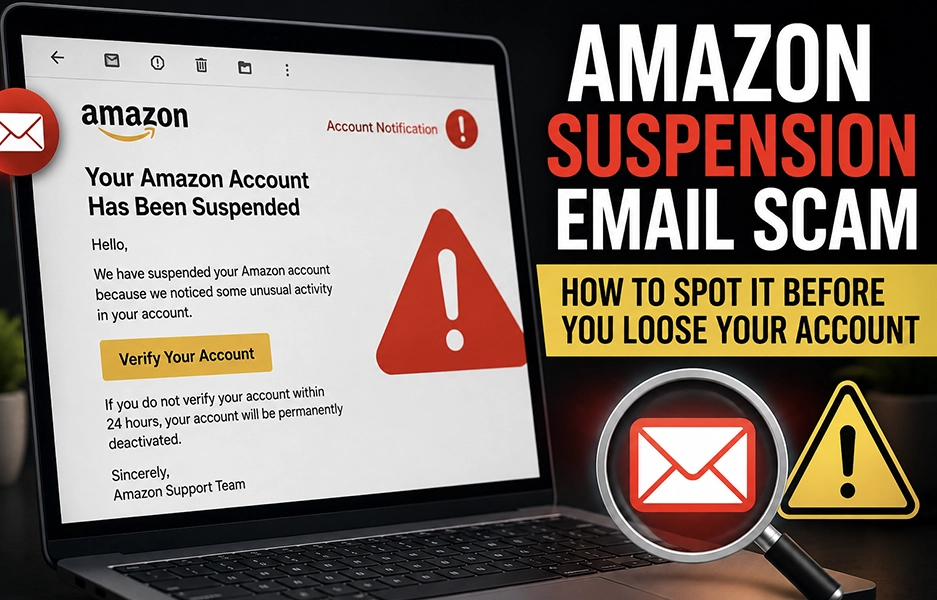
Security alert emails are among the most effective phishing scams targeting Amazon customers — and for good reason. Subject lines like “Amazon Security Alert: Suspicious Login Attempt,” “Unusual Activity Detected on Your Account,” or “We Locked Your Account for Protection” trigger immediate fear and urgency. They’re engineered to look exactly like real Amazon security notifications. This guide breaks down how the Amazon security alert scam works, nine red flags to watch for, and exactly what to do if you’ve already clicked.
Why Amazon Suspension Email Scams Are So Effective
Scammers choose account suspension threats because they trigger a specific combination of emotional responses that override rational thinking. When you believe you might lose access to your Amazon account — your order history, Prime membership, digital purchases, payment methods, and gift card balance — the instinct is to act immediately, without verifying.
- Fear: Losing account access feels like a real, tangible loss.
- Urgency: A 24-hour deadline makes hesitation feel dangerous.
- Loss aversion: People act harder to prevent losses than to gain equivalent benefits.
- Confusion: “Did I do something wrong?” creates doubt that pushes you toward the scammer’s link.
This combination makes suspension emails significantly more effective than generic phishing attempts. They’re part of the same pattern as Amazon security alert scams and unusual activity emails — all designed to exploit the emotional response to a perceived account threat.
How the Amazon Suspension Email Scam Typically Works
Understanding the mechanics of the scam is the first step to recognizing it. Here’s the typical sequence of a fake Amazon suspension email:
- You receive an email claiming your account has been suspended due to a suspicious login, payment failure, terms of service violation, unusual purchase activity, or identity verification requirement.
- The email includes a prominent call-to-action button: “Verify Account,” “Restore Access,” “Appeal Suspension,” or “Confirm Your Identity.”
- Clicking the link takes you to a fake Amazon login page — often a near-perfect visual replica of the real site.
- When you enter your email and password, attackers capture those credentials instantly.
- Some fake pages also prompt for your two-factor authentication code, allowing attackers to bypass that protection in real time.
Once attackers have your login credentials, they can change your password, lock you out, and begin exploiting your account within minutes. The speed of account takeover after a successful suspension scam is why recognizing these emails before clicking is so critical — account recovery after a lockout is time-consuming and stressful.
The Golden Rule: Never Click the Email Link
The single most important habit to develop is this: never click any link or button inside a suspension email, regardless of how urgent or legitimate it looks.
Every time you receive a suspension notice, follow these steps instead:
- Do not click any links, buttons, or attachments in the email.
- Open a new browser window or tab.
- Type amazon.com manually into the address bar.
- Log into your account using your normal credentials.
- Check your account dashboard for any suspension notices or required actions.
- Navigate to Account → Message Center — legitimate account communications appear there.
If your account were genuinely suspended, you would see it clearly after logging in. If everything looks normal — the suspension email was fake. This same approach applies to Amazon refund emails, password reset emails you didn’t initiate, and one-time passwords you didn’t request.
10 Warning Signs the Amazon Suspension Email Is a Scam
Train yourself to spot these red flags before engaging with any suspension email:
1. The sender email is slightly misspelled. Legitimate Amazon emails come from @amazon.com, @amazon.ca, or @amazon.co.uk. Fake versions use domains like @amaz0n-security.com, @amazon-alert.net, or @account-amazon-support.co. One wrong character makes it fraudulent.
2. It demands immediate action. Phrases like “Act within 24 hours,” “Immediate verification required,” or “Failure to respond will result in permanent closure” are psychological manipulation. Amazon rarely uses extreme urgency without reflecting the issue inside your account dashboard.
3. The greeting is generic. Fake suspension emails often begin with “Dear Customer,” “Hello User,” or “Amazon Member.” Legitimate Amazon communications typically include your full account name.
4. The link doesn’t go to amazon.com. Hover over any link or button without clicking. If the URL doesn’t clearly start with https://www.amazon.com/, it’s not legitimate. Watch for URLs that include the word “amazon” but use a different domain — like amazon-account-support.net.
5. It asks for sensitive information. Amazon will never email you asking you to confirm your full credit card number, provide your password, share a one-time verification code, or upload identity documents through an email link. Any such request confirms the email is fraudulent.
6. It mentions vague “policy violations” without specifics. Scam emails often claim “You have violated our policy” without specifying which order, what action, or what rule was broken. Real enforcement messages include specific details.
7. The design looks slightly off. While some suspension scam emails are highly polished, many still have subtle flaws — strange capitalization, missing logos, broken images, or awkward phrasing. Amazon communications follow consistent, professional branding standards.
8. There’s an unexpected attachment. If the email includes files like SuspensionForm.pdf, IdentityVerification.zip, or AppealNotice.html, do not open them. Attachments in suspension scam emails often contain malware or redirect to fake login pages.
9. It appeared out of context. If you receive a sudden suspension notice with no recent unusual activity, no payment issues, and no failed login attempts on your end — it’s almost certainly a phishing attempt designed to create confusion where none exists.
10. It’s not in your Amazon Message Center. This is the most reliable test. Go to Account → Message Center inside your Amazon account. Legitimate account warnings appear there. If the suspension email doesn’t appear in your Message Center, it almost certainly didn’t come from Amazon.
What Happens If You Fall for a Suspension Scam
The consequences of entering your credentials into a fake Amazon suspension page can be serious and fast-moving. Once attackers have your login information, they typically:
- Change your password immediately to lock you out of your own account.
- Add new shipping addresses for expensive item deliveries.
- Place high-value orders using saved payment methods.
- Send themselves Amazon gift cards — a fast, difficult-to-reverse method of extracting value.
- Access saved credit and debit card information stored in your account.
- Attempt to access other accounts using the same email and password combination — which is why unique passwords are critical.
If your email account is compromised using the same password, attackers can intercept Amazon’s recovery emails, making account restoration significantly harder. If you find that your Amazon email address has been changed or you’re fully locked out, proceed through Amazon’s official account recovery process immediately and contact your bank if payment details may be at risk.
What to Do If You Clicked the Link
If you’ve already clicked a link inside a suspicious suspension email, the speed of your response is what determines how much damage can be prevented.
If you clicked but entered no information:
- Close the page immediately.
- Clear your browser cache and history.
- Run a malware scan if you’re concerned about the site you visited.
If you entered your Amazon login credentials:
- Go directly to amazon.com (type it manually) and change your password immediately.
- Enable two-step verification if it isn’t already active.
- Remove any unrecognized devices under Account → Login & Security.
- Check recent order history for purchases you didn’t make.
- Remove any unknown saved payment methods or shipping addresses.
- Contact Amazon customer service through the official site to report the incident.
If you entered payment or personal details:
- Contact your bank or card issuer immediately to report potential fraud.
- Request a card replacement if card details were entered.
- Monitor your bank and credit statements closely for the next 30-60 days.
- If you notice unauthorized Amazon purchases, report them to Amazon and your bank without delay.
How to Protect Yourself from Amazon Suspension Scams
A few consistent security habits provide strong protection against suspension phishing attacks and other Amazon account threats:
- Enable two-step verification. Even if scammers capture your password, they can’t access your account without your phone or authentication app. This is the single most effective protection against account takeover.
- Use a strong, unique password for Amazon. Never reuse your Amazon password on other sites. A password manager makes this practical without requiring you to memorize dozens of credentials.
- Review account activity regularly. Check your orders, payment methods, saved addresses, and connected devices monthly. Early detection limits the damage from any unauthorized access.
- Report phishing emails to Amazon. Forward suspicious suspension emails to [email protected]. Amazon actively investigates these reports and acts against fraudulent sender domains.
- Slow down before reacting. Fear-based emails are specifically designed to override logical thinking. The five seconds it takes to open a new browser and type amazon.com manually eliminates virtually every suspension scam threat before it can cause damage.
Why Amazon Suspension Scams Keep Growing
The volume and sophistication of account suspension phishing campaigns have grown significantly alongside the expansion of online shopping. Several factors drive this trend:
- Scale: Amazon has hundreds of millions of active customer accounts, giving attackers a massive pool of potential targets for mass phishing campaigns.
- High value: Amazon accounts contain saved payment methods, shipping addresses, purchase history, and sometimes significant gift card balances — making them highly valuable to attackers.
- Accessible tools: Phishing kits that clone Amazon’s visual design are widely available, enabling even low-skill attackers to deploy convincing fake suspension pages.
- Emotional effectiveness: Suspension threats exploit loss aversion in a way that generic spam doesn’t — the fear of losing something you already have is a more powerful motivator than the promise of gaining something new.
As these campaigns become more targeted and visually convincing, the defense remains simple and consistent: verify every account alert directly inside amazon.com, never through an email link. Whether it’s a suspension notice, a seller impersonation scam, or any other account-related email — your dashboard is the only source of truth.
Thank you for reading! The safest response to any Amazon suspension email is always the same: don’t click, open a new browser, and verify directly inside your account. If you believe your Amazon account has already been compromised or you’re dealing with unauthorized activity, act immediately — and reach out for guidance if you need support.
 Brand Alignment
